This website uses cookies. By clicking Accept, you consent to the use of cookies. Click Here to learn more about how we use cookies.
Turn on suggestions
Auto-suggest helps you quickly narrow down your search results by suggesting possible matches as you type.
Showing results for
- Solidigm
- Solid State Drives (NAND)
- P44 Pro nvme controller is down will reset
Options
- Subscribe to RSS Feed
- Mark Topic as New
- Mark Topic as Read
- Float this Topic for Current User
- Bookmark
- Subscribe
- Mute
- Printer Friendly Page

Options
- Mark as New
- Bookmark
- Subscribe
- Mute
- Subscribe to RSS Feed
- Permalink
- Report Inappropriate Content
09-01-2023 11:50 AM
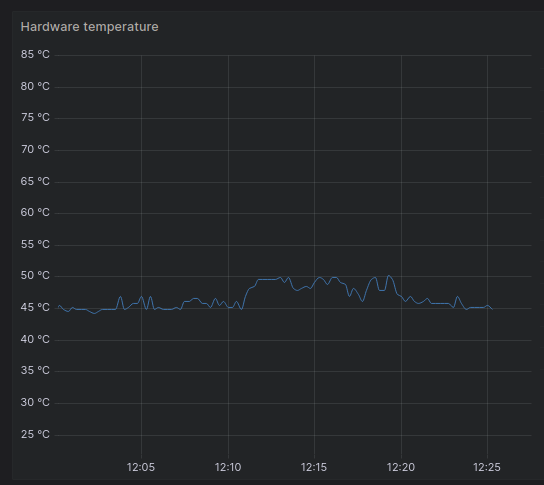
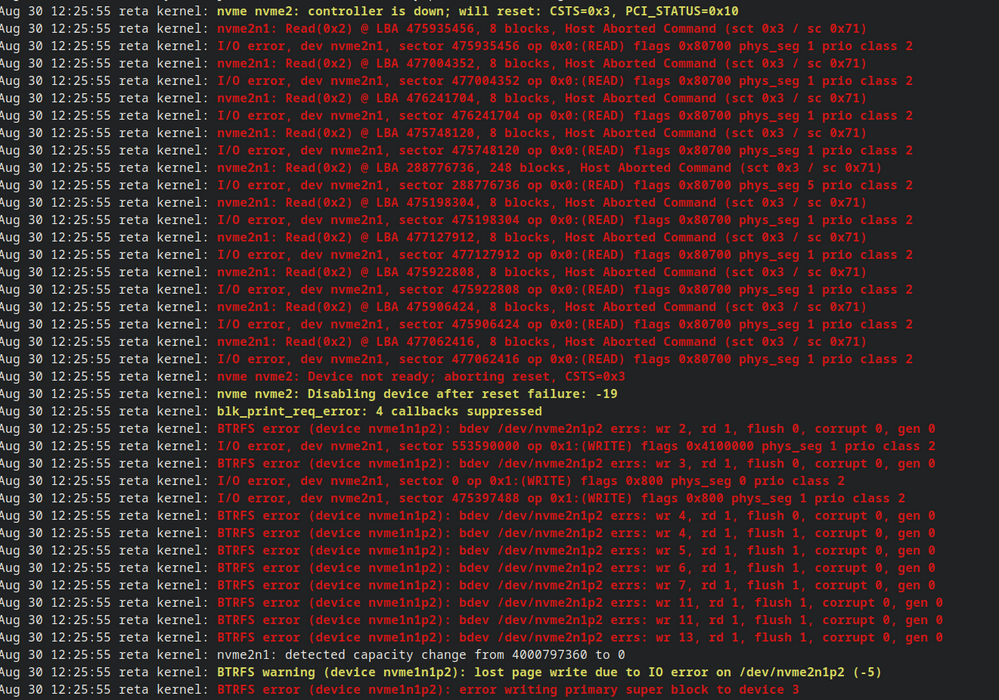
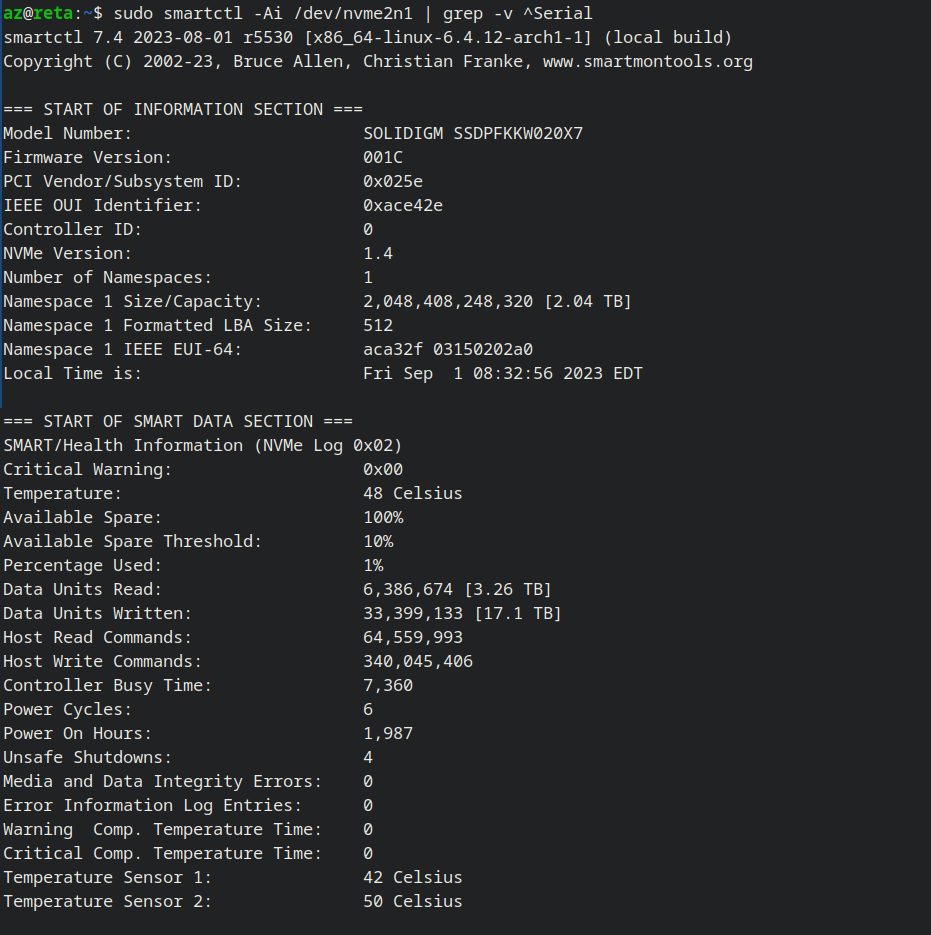
NVMe (P44 Pro, model SSDPFKKW020X7) sometimes just disconnects and stops working, smart(attached) reports everything being normal, temperatures are also within reason (around 45-50C, graph of a few minutes before the incident attached). Drive disconnects after about a week or two of uptime (although it was fine for the first month and a half of use). OS is arch linux running kernel version 6.4 (and a few older ones, but this is for the most recent occurrence).
Firmware is on the latest version (checked with the update tool).
I removed the serial number from my smart output (just to be safe), but can send it if needed.
I saw someone with what looks like a related issue (on windows, I assume it's blue-screen-ing due to a spontaneous disconnect): https://community.solidigm.com/t5/solid-state-drives-nand/p44pro-too-hot-to-lose-disk/td-p/24074
Solved! Go to Solution.
1 ACCEPTED SOLUTION

Options
- Mark as New
- Bookmark
- Subscribe
- Mute
- Subscribe to RSS Feed
- Permalink
- Report Inappropriate Content
05-25-2024 04:41 PM
Was there ever a resolution to this? I'm seeing the same behavior on Windows 10. I've had a crash around once a month for the last 7 months or so ever since I replaced my system drive with a Solidigm P44 Pro 2TB.
The system stops responding and fails to write a crash report to the drive. Upon reboot, the drive no longer shows up in the BIOS. (I have two of these NVMe drives installed, and only the one with the boot/system partition on it is missing when this happens. The other drive still shows as normal.) Powering-down the system and restarting restores normal operation until the next time it crashes.
I tried contacting support, but they wouldn't do anything about it, since the drive's SMART data shows no problems.
I finally got sick of the issue after another crash yesterday and replaced the drive with a Samsung 990 Pro.
24 REPLIES 24
Options
- Mark as New
- Bookmark
- Subscribe
- Mute
- Subscribe to RSS Feed
- Permalink
- Report Inappropriate Content
08-14-2024 09:57 AM
Just about 3 months since I replaced my P44 with a Samsung 990. For anyone wondering: I've not had a single reboot or crash since replacing the drive. And this is despite the fact that I've gone through some very heavy usage periods in that time.


Options
- Mark as New
- Bookmark
- Subscribe
- Mute
- Subscribe to RSS Feed
- Permalink
- Report Inappropriate Content
08-15-2024 11:16 PM
Dear oscarfowler,
Thank you for the information provided. We are sorry that you have a problem with our drive.
We would like to suggest you use a standard driver, as it might help to solve your issue. Anyway, you always can contact us to create a case by using this link- Create Case · Customer Self-Service (solidigm.com)
Kind regards,
Gleb
Solidigm Customer Support

Options
- Mark as New
- Bookmark
- Subscribe
- Mute
- Subscribe to RSS Feed
- Permalink
- Report Inappropriate Content
11-18-2024 07:51 AM
Dear oscarfowler,
Thank you for your insights regarding the P44 Pro drives. It's intriguing that different usage patterns and motherboard connections could influence the drive's behavior. Switching the NVMe socket from one connected directly to the CPU to one connected to the chipset, as you did, is a worthwhile experiment to see if it resolves the issue.
Kind regards,
Gleb
Solidigm Customer Support


Options
- Mark as New
- Bookmark
- Subscribe
- Mute
- Subscribe to RSS Feed
- Permalink
- Report Inappropriate Content
08-06-2025 10:52 PM
I can add another report of the same issue:
P44 Pro 2TB, ssdpfkkw020x7
Windows 11
B550 3900xt
The system stops responding and fails to write a crash report to the drive. Upon reboot, the drive no longer shows up in the UEFI.
Need to do a hard power-down and restart to have the drive recognized again.
SMART and temps seem normal.
Options
- Mark as New
- Bookmark
- Subscribe
- Mute
- Subscribe to RSS Feed
- Permalink
- Report Inappropriate Content
08-07-2025 04:35 AM - edited 08-07-2025 04:35 AM
Dear quasiqubit,
Thank you for sharing your experience. We’re sorry to hear about the issue you're encountering with your P44 Pro.
To investigate this further, we recommend opening a support case through MySolidigm so our team can assist you directly and review your drive's logs and system configuration.
We appreciate your feedback and are here to help.
Best regards,
Gleb
Solidigm Customer Support


Related Content
- 2 x Intel D3-S4510 SSDs Locked (asking Pre-POST Password) after BIOS Secure Erase in Solid State Drives (NAND)
- Intel 545s Stuck in Read-Only Mode (100% Health) - MAS Tool Failure "Drive no longer supported" in Solid State Drives (NAND)
- Sustained write performance of P44 Pro in a cache-heavy video workflow? in Solid State Drives (NAND)
- D7-PS1030 E3.S cannot update to G75G150? in Solid State Drives (NAND)
- SSD Intel SSDPEKKW512G7: Remove write protection in Solid State Drives (NAND)
