This website uses cookies. By clicking Accept, you consent to the use of cookies. Click Here to learn more about how we use cookies.
Turn on suggestions
Auto-suggest helps you quickly narrow down your search results by suggesting possible matches as you type.
Showing results for
- Solidigm
- Solid State Drives (NAND)
- Re: P44pro Sequential writes are unusually slow
Options
- Subscribe to RSS Feed
- Mark Topic as New
- Mark Topic as Read
- Float this Topic for Current User
- Bookmark
- Subscribe
- Mute
- Printer Friendly Page
P44pro Sequential writes are unusually slow

Options
- Mark as New
- Bookmark
- Subscribe
- Mute
- Subscribe to RSS Feed
- Permalink
- Report Inappropriate Content
10-23-2023 02:24 AM - edited 10-23-2023 02:24 AM
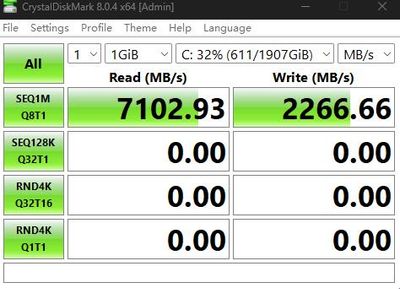
Today, when I was copying a large number of files, I found that the writing speed of the p44pro was very slow.
Then I used CrystalDiskMark 8 to test it, and the sequential writing speed was only 2000MB/s.
I tried restarting and manually optimizing trim but it couldn't be solved.
I need help.
ps.Other ssd works fine, win11 23h2
15 REPLIES 15

Options
- Mark as New
- Bookmark
- Subscribe
- Mute
- Subscribe to RSS Feed
- Permalink
- Report Inappropriate Content
05-13-2025 04:57 AM
Only a new firmware update can resolve this issue.
The same product, the SK hynix P41, was able to resolve the issue through a firmware update. 51060A20->51061A20

Options
- Mark as New
- Bookmark
- Subscribe
- Mute
- Subscribe to RSS Feed
- Permalink
- Report Inappropriate Content
05-13-2025 06:32 AM
It's been years but Solidigm hasn't cared to fix the problem my p44 pro was thrown away, never produced Solidigm again. I've never seen a company that cares about the customer like Solidigm


Options
- Mark as New
- Bookmark
- Subscribe
- Mute
- Subscribe to RSS Feed
- Permalink
- Report Inappropriate Content
05-14-2025 04:34 AM
Hello Superino,
We understand your frustration and recognize the sarcasm in your message. However, as we've mentioned several times before here, if you're not satisfied or are still experiencing issues, you're always welcome to open a warranty case.
Our Support Hub remains available to all customers, and our team of experts will be happy to assist you with warranty-related concerns or other support options: https://support.solidigm.com.
Your feedback is important to us, and we have already escalated this issue internally for further review.
Kind regards,
Gleb
Solidigm Customer Support

Options
- Mark as New
- Bookmark
- Subscribe
- Mute
- Subscribe to RSS Feed
- Permalink
- Report Inappropriate Content
05-14-2025 04:39 AM
Dear Champloo,
Thank you for your message.
Please note that while the SK hynix P41 and the Solidigm P44 Pro may appear similar, they are distinct products with different firmware, validation, and support paths. A firmware update for the P41 does not automatically apply to the P44 Pro.
Kind regards,
Gleb
Solidigm Customer Support


Options
- Mark as New
- Bookmark
- Subscribe
- Mute
- Subscribe to RSS Feed
- Permalink
- Report Inappropriate Content
03-26-2024 11:34 PM
Techpowerup did a writeup on this topic:
https://www.techpowerup.com/review/solidigm-p44-pro-2-tb-1-tb/6.html
~4000 MB/s SLC cache has limited capacity (apparently limited to ~300 GB total on the P44 Pro 2TB) and the drive can only write at that speed until the SLC cache becomes full. At that point the drive begins writing to much slower TLC flash at ~2000 MB/s.
When you do a test in Crystaldiskmark, there is no indicator to tell you how full your NVME SLC cache may currently be. That's why you can run 100 tests with different test sizes/ data types and get different write speed results.
It seems like ~2000 Mb/s sustained write speed is realistic for SEQ1M Q8T1 on this drive. You can expect burst speeds up to 4000 MB/s, but they could be infrequent depending on how frequently/ how much you're writing to your drive.

Related Content
- Sustained write performance of P44 Pro in a cache-heavy video workflow? in Solid State Drives (NAND)
- P44pro Sequential writes are unusually slow in Solid State Drives (NAND)
- DC P3520: Selected drive is in a disable logical state in Solid State Drives (NAND)
- Intel 600p 256g inconsistent very slow writes in Solid State Drives (NAND)
- Serious performance regression with DC P3700 2TB AIC drive in Solid State Drives (NAND)
